Dilbert cartoonist Scott Adams clearly understands the trepidation with which most of us approach a system migration. Change is good, one of his cubicle dwellers says to the other. You go first. The co-worker looks as if hes just been challenged to jump off a cliff.
However, while system migration will probably never make anyones Top 10 list of favorite assignments, thousands of companies have migrated, bulldozed, progressed, evolved, torn out or replaced their systems and survived to tell the tale. The first step is to take a deep breath migration is not as daunting as it seems and understand and prepare for the most common pitfalls. Sure, youll probably overlook one or two, but the more complete your preparation, the better equipped youll be to take those surprises in stride.
To help you get started, well look at 10 basic migration techniques, highlight the hurdles youre most likely to encounter, and suggest how to deal with them.
1. HMI replacement
Distributed control systems (DCSs) come with a human/machine interface (HMI) system that is supported for a limited time (Figure 1). At many plants, multiple types of HMIs are installed. At some point, the HMI hardware will wear out or the cost of finding replacement parts will become prohibitive. The good news is that replacing multiple, proprietary HMIs with a single, open system can significantly cut your costs while eliminating the need for operators to learn to use multiple interfaces.
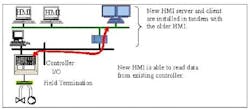
Figure 1. New HMI continuously communicates with legacy controllers, preferably after parallel operation with the old HMI.
Your goal should be to find a solution that allows the new HMI to communicate with existing controllers on a continuous basis. Ideally, the new HMI should run in parallel with the older one for a while, giving operators continuity during the transition.
Hurdle: For data in the controllers to be continuously available, the tag database, if one exists, must be moved from the legacy HMI system to the new one. Beware of OLE for Process Control (OPC) server vendors that claim to be able to communicate with any legacy system. Rarely will they have all the connections needed to get every piece of data from the controller. They will also lack a tool to move the tag database. If the controller vendor offers an OPC server, it may be purposely limited so that only its new HMI can see all of the data required.
Suggestion: Use third-party HMIs with OPC connectivity (assuming your controllers have OPC server software available). The connection will require some manual manipulation and, possibly, double database entries.
Ask your existing systems vendor what evolutionary paths are available to connect its newest HMI with your existing controllers. Upgrades to the controller or network may be required before a connection to the new HMI can be made. Depending upon the vendor, you may have to wait in line behind other users with legacy systems before it develops an evolution plan for yours. The plan can take years.
If your vendor cant or wont help, consider a DCS vendor that does the whole soup-to-nuts for you and will take full responsibility for ensuring the system works.
2. HMI conversion
In this strategy, existing intellectual assets (software configuration like graphics, faceplates, trend configuration and historical data) are moved from the old HMI to the new HMI (Figure 2). The HMI conversion is done once to move data and assist in the HMI migration. Of course, that assumes the old graphics and configuration are worth moving.
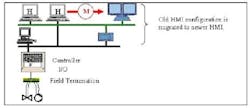
Figure 2. A one-time effort moves graphics, faceplates, historical data and other intellectual assets to the new HMI.
Hurdle: Depending upon your system, it may be easy (e.g., Visual Basic-based) or difficult (proprietary UNIX-based) to move the graphical data from one HMI to another.
Suggestion: Be sure of why you are moving the graphics in the first place. The graphic package of the new system may have the features you want. If so, its best to start from scratch. The new system may also use an object-oriented approach to the entire HMI. Again, its best (or required) to start from scratch to take advantage of this approach.
The HMI vendor is the best place to start. Ask if it has any graphic/trend/report migration tools. Be sure to probe its answers. Most will say they offer tools. However, you may find the vendor has to do everything by hand, which increases the chances for errors and drives up costs.
Most importantly, be sure the tool includes a function for historical data migration. Surprisingly, an incumbent vendor may not have the ability to move historical data from its own legacy systems to its new HMI historian due to the nature of the legacy database structure. If this is the case, check with other DCS vendors; they may have access to better resources for this important service. Whats the point of migrating to a new HMI if you must keep the old HMI around just to look at historical data?
3. Other special applications
Applications loaded on your HMI to do specific tasks, including batch management or maintenance management, need special attention (Figure 3).
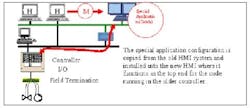
Figure 3. Special applications like batch management in legacy systems can pose special challenges in migration.
Hurdle: The key point is to save the intellectual investment of the special application while migrating to a similar but state-of-the-art application for viewing and manipulating older data.
Suggestion: Look to your existing vendor for a migration plan for this special software. However, the vendor may not have sold many of these applications and, therefore, may have decided not to support a migration solution. Third-party companies often can offer a solution, but you should understand the amount of re-configuration work that will be required. Some seamless solutions are available for certain batch management applications.
4. Engineering library
If the time comes to expand the plant and introduce a new controller, you will have to configure from scratch. However, the availability of a familiar set of function blocks can ease the job and avoid special training. So, look for a vendor that supplies in the engineering tool for the new controller a library of IEC1131 function blocks that emulate the blocks or other languages of the existing controller library (Figure 4).
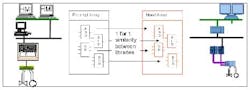
Figure 4. The availability of a familiar set of function blocks can make configuration of a new controller easier. (click to enlarge)
Hurdle: The new controller library must use the same algorithms that the old controller used. Some DCS vendors have this library. Most do not.
Suggestion: Ask your controller vendor if its new controller configuration tool has a library that emulates the old controllers code.
5. Controller application conversion
When the time comes to replace a legacy controller, use a tool to convert the existing process configuration (Figure 5).
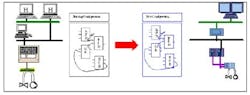
Figure 5. Tools for use with older controllers not based on IEC1131 can be hard to find and generally are limited. (click to enlarge)
Hurdle: Most new controllers are based on IEC1131. However, older controllers are not, heightening the complexity of creating an automatic software solution. As a result, some vendors have abandoned this solution due to cost.
Suggestion: Ask your controller vendor if it has a controller application conversion tool. Most vendors, at best, will only have a tool for their own legacy systems. Siemens is working on a generic tool that can be used on APACS as well as other vendors controller code.
6. Controller network gateway
If you have old and new controllers mixed together in your system, a communication gateway providing peer-to-peer communications between them allows for more-complex control algorithms (Figure 6). It also enables the old and new systems to be online simultaneously, providing for a phased, stepwise migration.
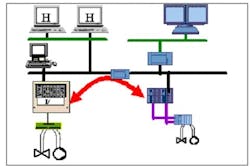
Figure 6. Peer-to-peer communication between old and new controllers allows both to be online simultaneously.
Hurdle: Communication protocols may differ between old and new controllers and the vendor of the older controller may not have the tools necessary to communicate on newer media.
Suggestion: The incumbent vendor may have the best tools for communicating to its own newer controllers. If your controller vendor cant help, another control system company may be able to provide the communication translation know-how and necessary hardware and software products.
7. I/O gateway
One of the easiest ways to get on board with new equipment is by using new input/out (I/O) modules (Figure 7). The most open method is to use a fieldbus (Profibus, for example) card. This allows new I/O modules to accommodate any remote I/O or expansion need.
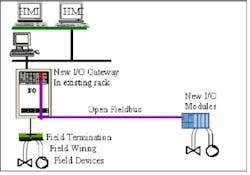
Figure 7. A fieldbus card can provide an easy and open way to add new I/O modules to a legacy system.
Hurdle: This solution requires your DCS vendor to offer a fieldbus board for the legacy controller.
Suggestion: Contact your controller vendor to see if it has a fieldbus interface. The incumbent or new DCS vendor can supply the I/O modules, provided they are fieldbus compatible.
8. I/O replacement
This approach retains the termination and existing I/O rack. The replacement I/O is part of the new system, allowing field signals to bypass the legacy controller and move directly to the new controller (Figure 8). The old controller board is removed. The vendor of the new system takes responsibility for the old rack where the new module is mounted.
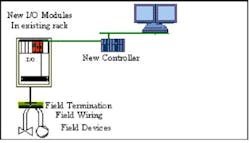
Figure 8. An existing rack can be retained if special I/O modules are installed in the legacy controller slots.
Hurdle: This solution requires special hardware modules that fit into the legacy controller slots. The drawback to this approach is that it puts a specialized I/O module (which may not be supported as well as other mainline products) into an old backplane. Also, this solution forces you to migrate completely, eliminating the potential to keep older HMIs online at the same time as new HMIs. The new controller must be used to control the process, so other tools are required to move the legacy controller configuration to the new controller.
Suggestion: Consider phased options first. This solution may look easy to implement, but it requires wholesale movement of controller application configuration and a full replacement of HMIs.
9. I/O interface
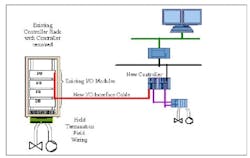
This strategy enables the new controller to use an existing I/O subsystem (field devices, racks, terminations and I/O modules) and, so, saves considerable rewiring costs (Figure 9). The legacy I/O stays in place and the new controller interfaces with it. The old controller is removed.
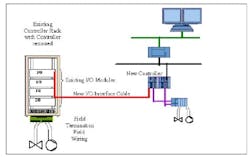
Figure 9. Use of existing field devices, racks, terminations and I/O modules avoids significant rewiring costs.
Hurdle: Similar to the I/O replacement solution, the I/O interface strategy requires a special board that fits into the old controller backplane. The good news is that only one board per controller is needed.
Suggestion: In most cases, the incumbent vendor is the first place to turn for this kind of solution.
10. Field termination assemblies
Saving the field termination assembly (FTA) lives at the very bottom of the food chain of migration solutions because it comes closest to complete rip-out and replace (Figure 10). This hardware solution preserves existing wiring by providing a 1:1 replacement of existing terminations and connection to new I/O modules via a new FTA (with the same form/fit and function).
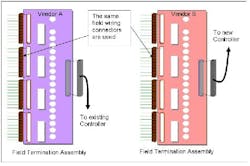
Figure 10. Replacing legacy FTAs with ones for the new controller that use the same connectors preserves existing wiring.
Hurdle: Ideally, an FTA should be the same size as the original terminations (so that no additional cabinet space is required) and use the existing connectors of the field wiring (so that no rewiring is needed), saving considerable labor costs.
Suggestion: The incumbent vendor may have an FTA for its legacy equipment similar to a small patch panel for cable translation between the old and new terminations.
First steps
One of the keys to a successful migration is to evaluate your existing system to determine which assets should be kept and which should be replaced. It is common to focus on preservation of field devices and installed wiring. However, in some cases, the value of the intellectual property dwarfs that of the hardware. Significant process expertise from years of continually optimizing the process is tied up in the controller program and HMI application. Some vendors have developed tools that automatically convert process graphics, controller code and historical information.
Be wary of one-off solutions. Some vendors create application patches before fully productizing the solution. This could result in long-term maintainability and supportability issues. Your best bet is a vendor that fully productizes its offerings and backs them with the same level of technical support available with its mainstream products.
First consider an HMI replacement solution. This gives operators the longest time with the old system. You want the HMI to be accepted by your operators, so it should have a similar look and feel if possible. You also want the HMI to gather at least the same amount of data as the old HMI, so look for a solution that has a similar throughput.
Another small step you can make is to add new I/O modules to an existing system using a fieldbus like Profibus.
Tools are available to redeploy controller code, but are never 100% complete. An experienced engineer must look at the code and complete the conversion.
The ideal strategy is to invest a few weeks working on site with the vendor doing the conversion; this ensures it stays on your project and allows you to give immediate feedback.
Chances are that you wont want the same graphic that you had in 1985. The best idea is to reconfigure the graphics yourself (after attending the vendors configuration class). Youll get the most up-to-date look and feel while taking advantage of all the latest features of the new graphics.
The bottom line
Each plant situation is unique. The optimum migration strategy depends upon numerous factors, including the cost of downtime, spare parts, maintenance, the age of existing system components, and the value that some assets (hardware and software) retain. Make sure your vendor offers you different approaches (such as HMI migration, communication gateways, I/O connectivity, termination replacements) so that you can decide what is best
The bottom line with any change is that someone has to go first. Swallow hard and take the first step. Chances are you will achieve a significantly better solution that puts you well ahead of your competition. And thats a reward that makes it worth facing your migration fears.
Ken Keiser is a migration marketing specialist for Siemens Energy and Automation, Spring House, Pa. E-mail him at [email protected].